
Bundesliga Kits Dream League Soccer 26


The arrival of the new season brings a wave of excitement for mobile football enthusiasts. For fans of German football, securing the latest Bundesliga Kits DLS 26 is the ultimate way to bring authenticity to the pitch. Dream League Soccer 2026 continues to be a powerhouse in the mobile gaming world, and while the game features many licensed leagues, the German top flight often requires a manual touch to get those iconic kits looking perfect.
In this comprehensive guide, we will explore everything you need to know about Kits Bundesliga DLS 2026, from the sleek designs of Bayern Munich and Borussia Dortmund to the step-by-step process of importing them into your game.
Why Use Custom Bundesliga Kits in DLS 26?
Dream League Soccer’s “Custom Kit” feature is one of its most beloved assets. It allows players to transcend the generic templates and wear the colors of global giants. Utilizing Bundesliga Kits DLS 26 provides several benefits:
- Realism: Experience the game with high-definition textures that mimic the real-life threads worn at the Allianz Arena or Signal Iduna Park.
- Identity: Stand out in Dream League Live matches with a unique aesthetic.
- Up-to-Date Designs: As the 2025/26 season progresses, kit manufacturers like Adidas, Puma, and Nike release special editions and third kits that you can instantly add to your collection.
Top Bundesliga Kits DLS 26 to Download
The German league is known for its bold designs and deep-rooted traditions. Here are the most sought-after Kits Bundesliga Dream League Soccer 26 for this season.
1. Bayern Munich DLS 26 Kits
The Bavarian giants always lead the charts in downloads. For DLS 26, the Bayern Munich home kit often features their classic red, but with modern accents like the subtle “M” embossed patterns representing Munich. Their away and third kits are equally popular, often featuring white, gold, or even dark navy palettes.
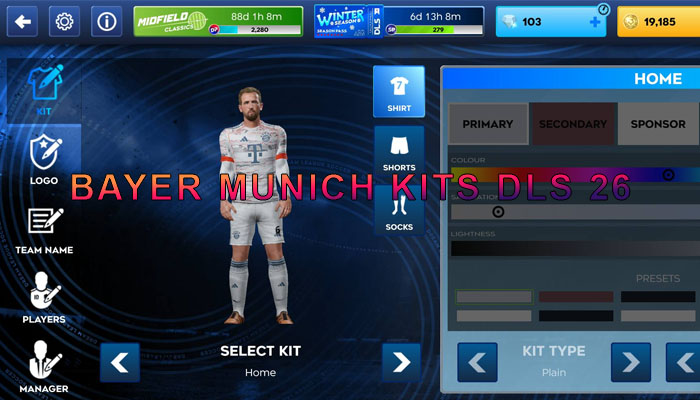
See more: Bayern Munich Kits DLS 26
2. Borussia Dortmund (BVB) Kits
The “Yellow Wall” wouldn’t be complete without the striking black and yellow stripes. The DLS 26 Bundesliga kits for Dortmund draw inspiration from their legendary 90s designs, offering a retro-modern look that looks fantastic on mobile screens.

See more: Borussia Dortmund Kits dls 2026
3. Bayer Leverkusen (The Champions)
After their historic rise, Bayer Leverkusen kits have become a must-have for DLS players. The red and black “Werkself” designs are sleek, professional, and symbolize a new era of German football dominance.
4. RB Leipzig and Eintracht Frankfurt
For those who prefer a more modern or “urban” aesthetic, RB Leipzig’s white and red kits or Frankfurt’s bold black-and-red vertical stripes are top-tier choices for Kits DLS 26 Bundesliga.
How to Import Bundesliga Kits DLS 26 (Step-by-Step)
Importing your favorite team’s colors is a straightforward process, but it requires precision. Follow these steps to ensure your Kits Bundesliga 26 DLS appears correctly.
Step 1: Find a Valid URL
The most important part of the process is obtaining a valid .png link. The game requires a 512×512 pixel image hosted on a secure URL. You can find these on dedicated DLS kit websites or community forums.
Step 2: Open Dream League Soccer 26
Launch the game and navigate to the “My Club” tab on the main menu.
Step 3: Access Customization
Click on “Customise Team”. Here, you will see options for “Edit Kit,” “Edit Logo,” and “Edit Players.”
Step 4: Use the Kit Importer
Select “Edit Kit” and then tap the “Custom Kit” button at the bottom left. Note: This feature usually requires a small one-time payment of “Gems” within the game to unlock.
Step 5: Paste the URL
A text box will appear. Paste the URL of your chosen Bundesliga Kits DLS 26 here. Ensure the link ends in PNG.
Step 6: Confirm and Save
Hit “Confirm.” The game will download the file and apply it to your team instantly. Repeat this for Away, Third, and Goalkeeper kits.
Pro Tips for the Best DLS 26 Experience
To make your Bundesliga squad truly authentic, don’t stop at the kits. Here are a few expert tips:
- Import the Logo: A kit looks incomplete without the official club crest. Use the “Custom Logo” feature to import the high-res Bundesliga team logos alongside your kits.
- Check Kit Resolution: Always look for “HD” or “512×512” kits. Low-resolution images will look blurry and pixelated during gameplay.
- Update Seasonally: Clubs often release “Special Edition” kits mid-season for the Champions League or domestic cups. Keep an eye on kit creator sites for these limited Kits Bundesliga DLS 26 releases.
Understanding Kit Templates
The DLS 26 Bundesliga kit structure is specific. It includes the shirt (front and back), sleeves, shorts, and socks all on one image sheet. If you are creating your own kits, ensure the elements are aligned with the standard DLS 26 template to avoid “glitched” textures where the socks appear on the shoulders!